
Is Your Legacy ERP System Holding You Back? Here’s When to Switch
Are you still patching together finance, operations, and reporting across multiple systems and feeling the strain every quarter-end? If your CFO role...
17 min read

NetSuite custom modules and SuiteApps solve different extension problems. In most cases, SuiteApps are the better choice when a requirement matches a common pattern and speed matters, while a NetSuite custom module is the better choice when the workflow is unique, strategically important, or deeply tied to your internal application logic.
That distinction matters because ERP customization is far more common than fully out-of-the-box deployment. Software Connect reports that only 3% of companies use ERP with out-of-the-box functionality, while the rest require some degree of customization; 33% to 48% request moderate customization, and 10% to 19% request personalized ERP solutions.
Neither path is universally better. SuiteApps offer speed and vendor-managed updates but introduce third-party roadmap dependency and potential integration complexity.
Custom modules give you control and the flexibility to automate unique management processes, but they require disciplined governance, testing, and ongoing maintenance using the SuiteCloud Development Framework. The wrong choice creates technical debt, slows upgrades, fragments your single source of truth, and increases total cost over time.
Use a SuiteApp when the requirement matches a common workflow such as localization, warehouse management, expense reports, POS, or WMS.
Use a NetSuite custom module when the workflow is unique, strategically differentiating, or tightly coupled to your internal approval workflow, data model, or integration logic.
SuiteApps usually deliver faster speed to value because they are prebuilt and often available through the SuiteApp Marketplace.
Custom modules offer more control over source code, roadmap, custom fields, custom record design, and how you extend NetSuite.
Certified “Built for NetSuite” SuiteApps reduce some upgrade risk because vendors test against Oracle NetSuite releases through the SuiteCloud Developer Network.
Custom modules can be upgrade-safe too if they are built on the SuiteCloud platform using supported APIs, SuiteScript, SuiteBundler, and the SuiteCloud Development Framework.
The best approach is usually hybrid: configure core Oracle NetSuite functionality first, add SuiteApps where they fit well, and build custom only where the business case is strong.
A NetSuite module is usually a custom-built extension or internal package created for a specific business using NetSuite customizations and the SuiteCloud platform. A SuiteApp is usually a packaged application, often third-party, distributed through the SuiteApp Marketplace or delivered by a vendor to solve repeatable use cases across many NetSuite customers.
That is the simplest answer, but the practical difference is this:
A SuiteApp prioritizes packaged speed and repeatability.
A custom NetSuite module prioritizes control and exact fit.
Choosing how to extend NetSuite is not just a feature checklist exercise. It is an architectural decision that affects your NetSuite account data model, upgrade behavior, support ownership, and long-term total cost. Extensions touch workflows, integrations, financial management, and reporting, and poorly designed choices fragment the single source of truth, complicate supply chain visibility, and increase the effort required to test and deploy each Oracle NetSuite release.
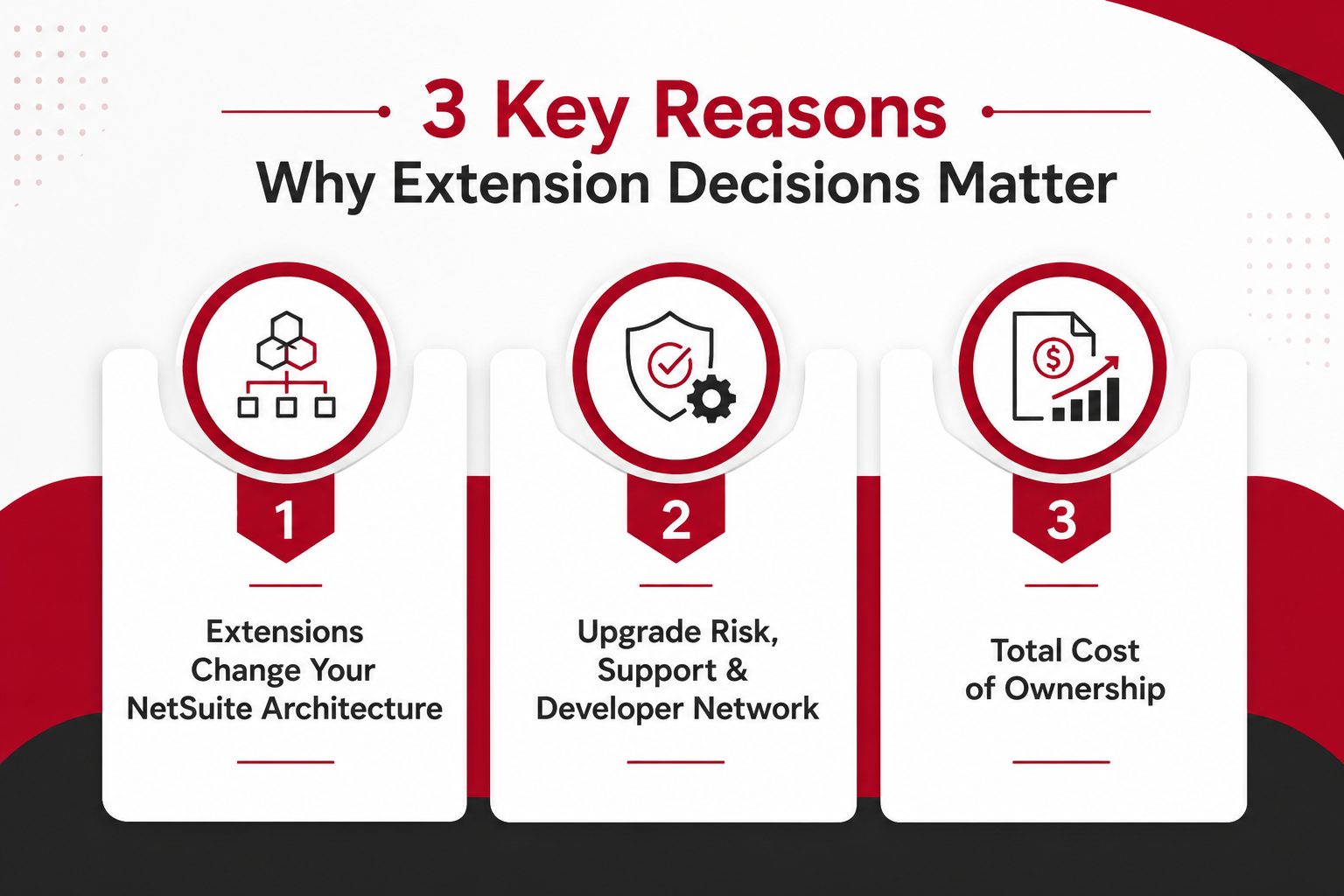
When you extend NetSuite, you modify the NetSuite platform in ways that persist across releases. SuiteApps and custom modules both introduce new data structures, workflows, and integration points. SuiteApps may add custom fields, custom records, or entirely new modules that must be installed separately. Custom modules do the same, but you control the design, naming conventions, and how tightly the logic integrates with existing core modules such as financial management, accounts payable, or project management.
Both approaches can fragment your data model if not governed carefully. A SuiteApp that maintains its own data store outside the NetSuite system complicates account reconciliation and financial reporting. A custom workflow that bypasses standard approval workflow logic creates exceptions that are hard to audit.
Each new application that extends NetSuite introduces API calls, web services dependencies, and potential XML format requirements that must be tested whenever Oracle updates its integration layer.
The goal is not to avoid extensions. The goal is to design them so they consolidate data, automate processes, and remain supportable as the NetSuite ecosystem evolves. That requires understanding how each extension type interacts with core modules, how data from NetSuite flows to and from external systems, and how changes will be tested and documented over time.
Upgrade risk is one of the most important factors in choosing between SuiteApps and custom modules. Oracle NetSuite releases updates twice per year, and each release can introduce changes to APIs, web services, workflows, and core modules. Extensions that do not follow best practices or that rely on undocumented behavior can break during upgrades, creating downtime, data errors, and emergency fixes.
Certified SuiteApps: "Built for NetSuite" solutions that are certified by the SuiteCloud Developer Network follow SDN standards and are tested against new features before each release. Vendors are responsible for adapting their SuiteApps to Oracle's changes, which reduces your internal testing burden. However, certification does not eliminate risk. Some third-party SuiteApps lag behind release schedules, and opaque internals make it harder to debug issues when they occur.
Custom Modules: Creating custom workflows, scripts, and data models using the SuiteCloud Development Framework gives you full visibility into how the logic works. If you follow SuiteCloud patterns, use supported APIs, and avoid deprecated methods, custom modules can be stable across upgrades. The tradeoff is that your team or NetSuite solution provider must test every change, document dependencies, and maintain governance around how customizations are deployed.
Third-Party Risk: Third-party SuiteApps introduce vendor roadmap dependency. If a vendor is acquired, shifts focus, or discontinues a product, your NetSuite account may be left with unsupported functionality. This risk is higher for niche SuiteApps with small user bases or vendors that do not participate actively in the SuiteCloud Developer Network.
Governance Need: The SuiteApp control center in NetSuite helps you track which SuiteApps are installed, which versions are active, and which updates are available. For custom modules, you need equivalent governance: a list of NetSuite customizations, documentation of what each script or workflow does, and a change management process that requires testing and approval before production deployment.
Total cost is often misunderstood in the SuiteApp vs NetSuite custom module debate. SuiteApps appear cheaper because they avoid upfront development effort, but they introduce recurring license fees, implementation costs, and potential price increases over time. Custom modules require discovery, design, development, and testing upfront, but they avoid ongoing vendor fees and give you control over the roadmap.
For SuiteApps, the total cost includes the initial license, implementation by the vendor or a NetSuite solution provider, training, and ongoing support fees. Some SuiteApps charge per user, per transaction, or per module, and those costs can grow as your business scales.
You also need to budget for regression testing after each Oracle NetSuite release, even if the vendor handles most of the adaptation work. If the SuiteApp touches financial reporting, account reconciliation, or advanced revenue management, you may need to reconcile data between the SuiteApp and core modules, which adds soft costs in the form of manual review and audit preparation.
For custom modules, the total cost includes discovery and assessment of business needs, design of workflows and data models, development using SuiteScript and SuiteFlow, testing across scenarios, documentation, and deployment.
After go-live, you need ongoing maintenance to adapt the customization to new Oracle NetSuite features, fix bugs, and enhance functionality as requirements evolve. If you work with a NetSuite solution provider, you will pay for those services on a project or retainer basis. If you manage customizations in-house, you need skilled administrators or developers who understand the SuiteCloud Development Framework and can troubleshoot issues quickly.
The key is to evaluate total cost over three to five years, not just the first year. A SuiteApp that costs $10,000 per year may seem cheaper than a $40,000 custom build, but over five years, the SuiteApp costs $50,000 plus implementation and testing effort, while the custom module costs $40,000 plus maintenance. The break-even point depends on how stable the requirement is, how often the SuiteApp vendor raises prices, and how much internal effort is required to keep the extension working smoothly.
Choosing between SuiteApps and custom modules requires a structured comparison across the decision criteria that matter most for your NetSuite account.
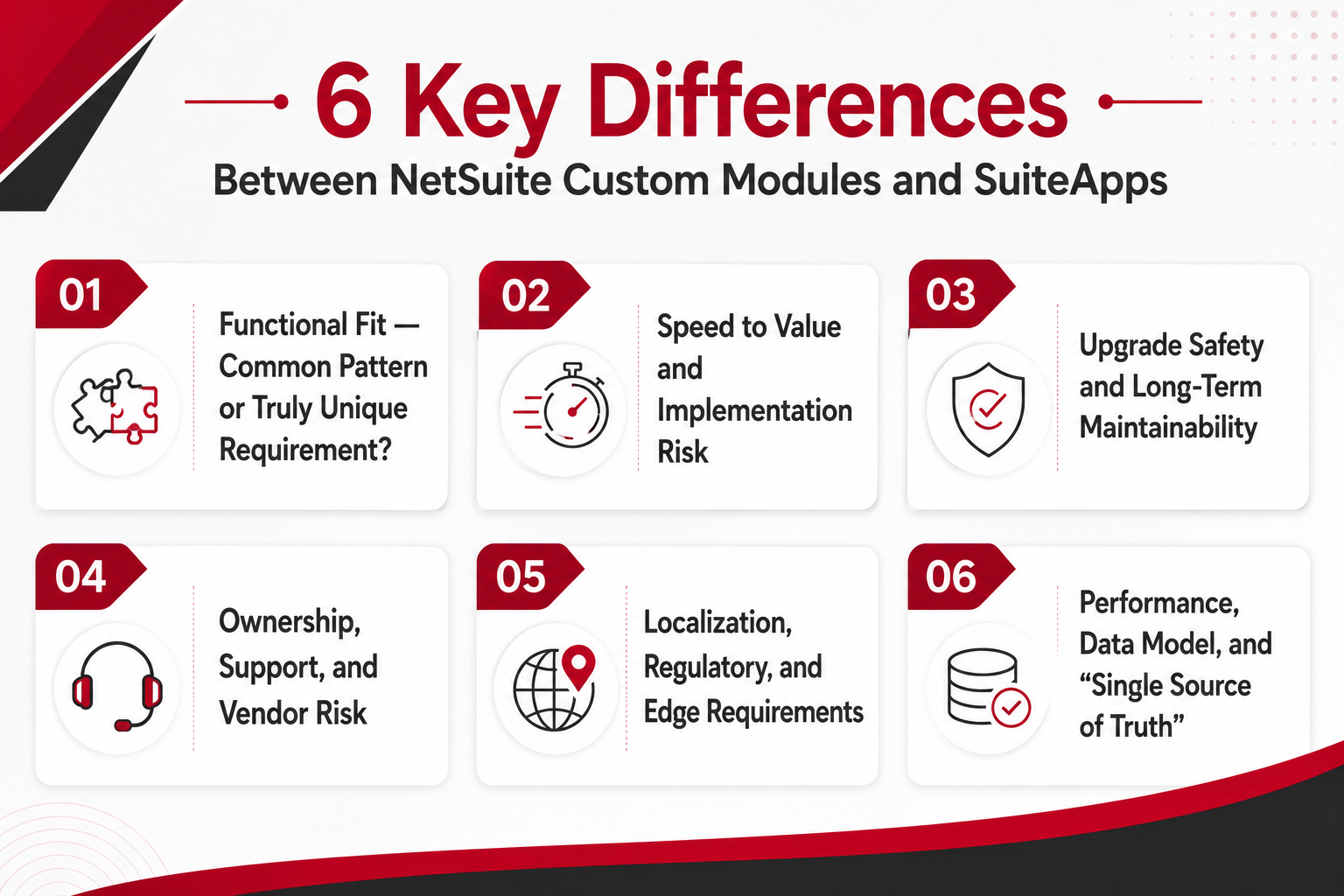
The first question is whether your requirement matches a common pattern that SuiteApps already solves, or whether it is unique enough that creating custom logic is the only way to automate it effectively.
SuiteApps:
Standard Use Cases: SuiteApps are ideal for common needs such as inventory management, warehouse management, order management, and supply chain visibility. Many certified SuiteApps cover these areas with prebuilt workflows, dashboards, and reporting that work well for businesses with standard processes.
Prebuilt Logic: SuiteApps come with predefined workflows and NetSuite functionality tuned to broad business needs. For example, a warehouse management system SuiteApp may include barcode scanning, bin tracking, and real-time inventory updates without requiring custom development.
Feature Coverage: SuiteApps often include additional modules and new features that must be installed separately but integrate with core modules such as financial management, accounts payable, and project management. This can reduce the need to build custom integrations.
Domain Specialization: Some SuiteApps target specific verticals or functions, such as professional services billing, planning and budgeting, or localization requirements in Colombia and other regions. If your needs align with a well-supported SuiteApp, functional fit is strong.
Custom Modules:
Unique Workflows: Custom modules are better when management processes and approval workflow requirements are highly specific to your organization. For example, a multi-stage approval workflow for accounts payable that routes invoices based on project codes, cost centers, and vendor risk scores may not map cleanly to any SuiteApp.
Tight Integration: Custom modules are a strong option when you must tightly integrate NetSuite and other business systems in real-time via API or web services. If your requirement involves pulling data from NetSuite, transforming it, and pushing it to external systems with custom logic, a SuiteApp may not offer the flexibility you need.
Data Model Control: Creating custom fields, custom records, and XML structures gives you full control over how data is stored, validated, and reported. This is useful when your chart of accounts, bills of materials, or financial reporting requirements do not fit standard patterns.
Niche Functions: They are suitable for specialized use cases not addressed by the list of NetSuite modules or certified SuiteApps. For example, a custom reconciliation process that matches invoices to purchase orders using proprietary matching rules may require SuiteScript logic that no SuiteApp provides.
Speed to value and implementation risk differ significantly between SuiteApps and custom modules. SuiteApps typically deploy faster because the logic is prebuilt, but they introduce dependencies on vendor timelines and support responsiveness. Custom modules take longer to build but give you more control over the roadmap and reduce reliance on third-party SuiteApps.
SuiteApps:
Faster Deployment: SuiteApps are typically quicker to configure and enable than building a new NetSuite module from scratch. Installation from the SuiteApp marketplace, configuration of settings, and user training can often be completed in weeks rather than months.
Lower Initial Risk: Proven implementations across customers reduce early-stage uncertainty. If a SuiteApp has been deployed successfully at dozens of companies, you can be more confident that it will work in your NetSuite account without major surprises.
Standardized Onboarding: Installation and configuration patterns are repeatable from the SuiteApp marketplace. Vendors often provide documentation, training materials, and implementation guides that streamline the process.
Dependencies: You must evaluate vendor project load, support responsiveness, and the SuiteApp distribution model. If the vendor is slow to respond to support tickets or has a backlog of implementation projects, your timeline may slip even though the SuiteApp itself is prebuilt.
Custom Modules:
Discovery Required: Custom modules require deeper upfront evaluation of business needs, management processes, and NetSuite account design. You need to document workflows, identify integration points, and design data models before development begins.
More Control: Creating custom logic can reduce long-term operational risk by avoiding over-reliance on a third-party SuiteApp. If the vendor changes direction, raises prices, or discontinues the product, you are not left with unsupported functionality.
Testing Overhead: Custom modules demand thorough testing across workflows, invoices, reconciliation, and financial reporting. You need to validate that the logic works correctly in all scenarios, that it does not break existing processes, and that it performs well under load.
Phased Delivery: They can be sequenced to automate the highest-value areas first, then extend NetSuite gradually. For example, you might build a custom approval workflow for accounts payable in phase one, then add automated invoice matching in phase two, rather than deploying everything at once.
Upgrade safety is a critical factor in the SuiteApp vs NetSuite decision. Oracle NetSuite releases updates twice per year, and extensions that do not follow best practices can break during upgrades. The question is whether you trust a third-party vendor to manage upgrade compatibility, or whether you prefer to own the testing and maintenance process yourself.
SuiteApps:
Certified Compatibility: Certified SuiteApps and "built for NetSuite" labels reduce upgrade surprises. Vendors that participate in the SuiteCloud Developer Network test their SuiteApps against upcoming releases and release updates before Oracle's general availability date.
Shared Responsibility: The vendor manages adaptation to Oracle NetSuite changes, including web services and API shifts. This reduces your internal testing burden, but it also means you depend on the vendor's release schedule and quality assurance process.
Opaque Internals: SuiteApps provide less visibility into internal implementation. If something breaks after an upgrade, you may need to wait for the vendor to diagnose and fix the issue, rather than troubleshooting it yourself.
Vendor Roadmap Risk: Changes in the direction of SuiteApp projects can affect your future NetSuite functionality. If the vendor decides to deprecate a feature or shift focus to a different market, you may be forced to migrate to a different solution or build custom logic to replace it.
Custom Modules:
Code Ownership: Your in-house team or NetSuite solution provider fully understands the creating custom logic and NetSuite customizations. You can review the code, test it against new releases, and fix issues without waiting for a third party.
Standards-Driven: Using the SuiteCloud Development Framework improves resilience across releases. If you follow SuiteCloud patterns, use supported APIs, and avoid deprecated methods, custom modules are less likely to break during upgrades.
Maintenance Burden: Custom modules require ongoing responsibility for updating SuiteScript, SuiteFlow, and configurations after upgrades. You need to allocate time and resources to test each release, document changes, and deploy fixes if issues are found.
Governed Changes: Custom modules require formal change management, testing, and frequently asked questions documentation. Without governance, customizations can become fragile and difficult to maintain over time.
Ownership and support models differ sharply between SuiteApps and custom modules. SuiteApps introduces third-party support dependencies and contractual terms that affect long-term flexibility. Custom modules give you control over the roadmap and support process, but they require internal or partner resources to maintain.
SuiteApps:
Third-Party Support: You rely on third-party SuiteApps vendors for bug fixes, enhancements, and troubleshooting. Support quality varies widely across vendors, and response times can be slow if the vendor has limited resources or a large customer base.
Contractual Terms: SLAs, renewal terms, and total cost must be evaluated carefully. Some SuiteApps lock you into multi-year contracts with automatic price increases, while others offer flexible month-to-month terms.
SDN Accountability: Membership in the SuiteCloud Developer Network provides some quality signal. SDN members agree to follow development standards, participate in testing programs, and maintain compatibility with Oracle NetSuite releases.
Vendor Consolidation: Acquisitions or roadmap shifts can affect long-term stability. If a SuiteApp vendor is acquired by a larger company, the product may be discontinued, merged with another offering, or deprioritized in favor of other initiatives.
Custom Modules:
Partner Choice: You can work with a NetSuite solution provider or internal team for support. This gives you the flexibility to switch partners if service quality declines, or to bring support in-house as your team gains expertise.
Documentation Needs: Custom modules require solid internal documentation to avoid key-person risk. If the developer who built the customization leaves the company, you need documentation that explains how the logic works, what dependencies exist, and how to troubleshoot common issues.
Flexible Roadmap: You decide when to add automation, new features, or integrations. This is useful when business priorities shift, and you need to adapt the NetSuite system quickly without waiting for a vendor to prioritize your request.
Internal SLAs: Support levels depend on your own resourcing and governance maturity. If you do not have skilled NetSuite administrators or developers, custom modules can become difficult to maintain over time.
Localization and regulatory requirements are areas where SuiteApps often provide strong value, especially for businesses operating in multiple countries or regions with complex tax and reporting rules. However, custom modules are a better fit when localization requirements are highly specific or when you need tight integration with existing financial reporting and account reconciliation processes.
SuiteApps:
Localization Packages: SuiteApps are ideal for localization and regulatory requirements in Colombia and other specific countries. Vendors such as LatAmReady and others offer SuiteApps that handle tax calculations, electronic invoicing, and statutory reporting for Latin American jurisdictions.
Regulatory Updates: Vendors often update SuiteApps for new tax rules and reporting formats. This reduces the burden on your team to track regulatory changes and adapt the NetSuite system manually.
Broad Coverage: One SuiteApp can cover many jurisdictions without building custom logic for each. This is useful for businesses that operate in multiple countries and need consistent localization across the NetSuite account.
Compliance Confidence: Using recognized localization providers makes it easier to document compliance for auditors. You can point to the SuiteApp's certification, vendor documentation, and track record rather than defending custom logic.
Custom Modules:
Custom Local Rules: Custom modules fit when you need tailored calculations or reporting beyond standard localization. For example, if your business has negotiated special tax treatment with a local authority, or if you need to generate reports in a format that no SuiteApp supports, custom logic may be the only option.
Selective Coverage: Custom modules are useful when only a subset of requirements differ from what SuiteApps offer. You can use a SuiteApp for most jurisdictions and build custom logic for the one or two countries where the SuiteApp falls short.
Tight Integration: Custom modules can integrate regulatory data flows directly into existing approval workflow or invoice processes. This is useful when localization logic needs to interact with custom fields, custom records, or workflows that are unique to your organization.
Audit Trail Control: You control XML formats, web services, and financial reporting logic for regulators. This gives you the flexibility to adapt quickly to new requirements without waiting for a vendor to release an update.
Performance and data model design are often overlooked in the SuiteApp vs NetSuite decision, but they have a significant impact on reporting, account reconciliation, and long-term scalability. SuiteApps that maintain separate data stores or that introduce heavy API traffic can complicate financial reporting and slow the NetSuite system. Custom modules that use native custom fields and records integrate more cleanly with core modules, but they require careful design to avoid performance issues.
SuiteApps:
Additional Data Stores: Some add-on applications maintain their own data structures alongside NetSuite account data. This can create challenges when consolidating data for planning and budgeting, financial reporting, or NetSuite Enterprise Performance Management.
Integration Load: SuiteApps may increase API and web services calls between the NetSuite platform and external services. If the SuiteApp makes frequent API calls to sync data, it can slow page load times and affect user experience.
Reporting Gaps: Data may need to be consolidated manually for financial reporting or account reconciliation. If the SuiteApp stores data outside the NetSuite system, you may need to export data, transform it, and import it back into NetSuite to generate complete reports.
Performance Tuning: Performance depends on vendor optimization and how deeply SuiteApps extend NetSuite. Some SuiteApps are well-optimized and have minimal impact on system performance, while others introduce noticeable slowdowns.
Custom Modules:
Native Data: Custom fields and records live directly in the NetSuite system and the chart of accounts. This makes it easier to consolidate data for account reconciliation, NetSuite Enterprise Performance Management, and dashboards without exporting and importing data.
Unified Reporting: Custom modules simplify reporting because all data is stored in the same database. You can use saved searches, SuiteAnalytics, and other NetSuite reporting tools to pull data from custom fields and records alongside standard fields.
Performance Responsibility: Your team must design efficient scripts and workflows to avoid performance issues. Poorly written SuiteScript can slow page loads, increase database query times, and affect user experience.
Scalable Design: Thoughtful design gives you the flexibility to consolidate and streamline data flows over time. As your business grows, you can refactor custom logic to improve performance without waiting for a vendor to release an update.
Read Next: Is Your NetSuite System Slowing You Down? Audit It in 90 Days
Choosing between SuiteApps and custom modules is not a binary decision. Most organizations use a mix of both, applying a clear evaluation framework to each requirement.
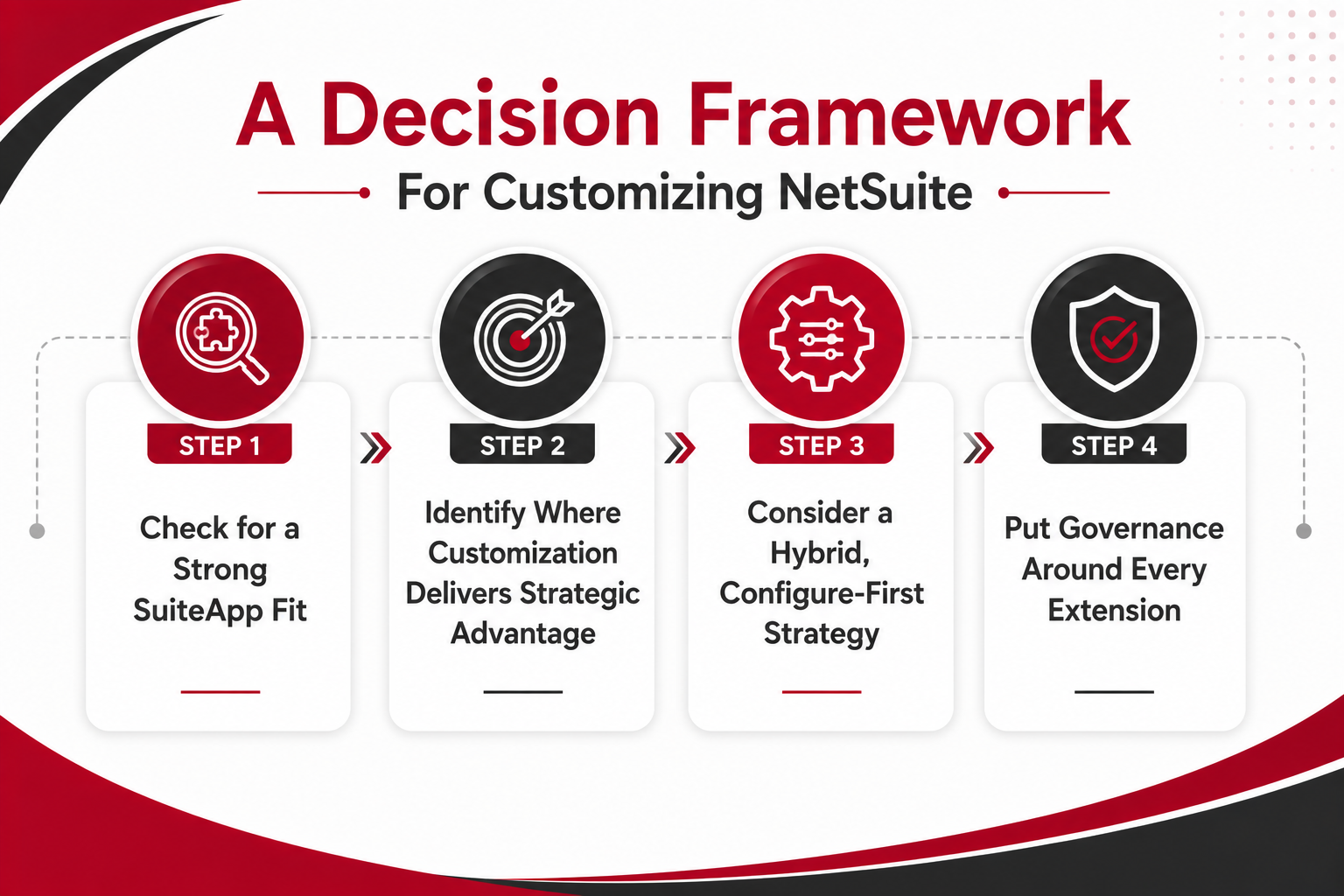
Before committing to custom development, evaluate whether a SuiteApp already solves the problem well enough. SuiteApps are most valuable when requirements are standard, time is short, and you prefer to avoid the maintenance burden of custom code.
Search the Marketplace: Look in the SuiteApp marketplace for built for NetSuite or certified SuiteApps that address your use case. Filter by category, read vendor descriptions, and review customer ratings.
Assess Coverage: Confirm that SuiteApps extend NetSuite across 80–90% of your required functionality. If the SuiteApp covers most of what you need and the gaps are minor, it may be worth accepting some limitations to avoid custom development.
Review References: Evaluate SuiteApp distribution history, customer reviews, and key differences with competitors. Ask the vendor for references from companies in your industry or with similar requirements.
Evaluate Integration: Understand how data from NetSuite will move via API, web services, or XML. Ask the vendor to explain the integration architecture, how often data syncs, and what happens if the integration fails.
Custom modules are most valuable when workflows, integration patterns, or data models are unique to your organization and create a competitive advantage. If the requirement is strategic, the investment in creating custom logic is often justified.
Unique Processes: Management processes that differentiate your business and cannot be mapped to core modules or SuiteApps are strong candidates for customization. For example, a proprietary pricing algorithm, a custom approval workflow that reflects your organizational structure, or a unique reconciliation process.
Complex BOMs: Bills of materials and warehouse management system needs not covered by existing offerings may require custom logic. If your manufacturing or distribution processes involve complex assemblies, kitting, or lot tracking that no SuiteApp handles well, custom modules may be the only option.
Tight Coupling: Requirements to automate and streamline NetSuite and other business tools in real-time often require custom integration logic. If you need to push data from NetSuite to external systems, transform it, and pull results back into NetSuite in near real-time, a SuiteApp may not offer the flexibility you need.
Governed Customization: Ensure initiatives are using the SuiteCloud Development Framework and are tested thoroughly. Custom modules should follow SuiteCloud patterns, use supported APIs, and be documented so they remain maintainable over time.
The best extension strategies often combine configuration, SuiteApps, and custom modules. Start by configuring core modules to match your processes as closely as possible. Add SuiteApps where there is a strong buy case, and the vendor is reputable. Build custom logic only for the small number of areas that create real competitive advantage or require deep automation.
This approach reduces total cost, minimizes upgrade risk, and keeps the NetSuite platform supportable. It also gives you the flexibility to adapt as business needs evolve. If a SuiteApp no longer meets your needs, you can replace it with custom logic or a different SuiteApp without reworking the entire NetSuite system. If a custom module becomes too complex, you can refactor it or replace it with a SuiteApp that has matured since you first evaluated it.
The key is to avoid over-customizing. Every extension adds complexity, testing burden, and maintenance effort. Before extending NetSuite, ask whether the requirement can be met by configuring existing functionality, training users to work differently, or simplifying the underlying business process. Extensions should solve real problems, not replicate legacy workflows that no longer make sense.
Governance is what separates supportable extensions from technical debt. Without governance, SuiteApps and custom modules accumulate over time, creating a fragmented NetSuite ecosystem that is difficult to test, upgrade, and maintain.
Inventory Extensions: Maintain a list of NetSuite modules, SuiteApps, and NetSuite customizations. Document what each extension does, who owns it, when it was deployed, and what dependencies exist. This inventory should be reviewed regularly and updated whenever extensions are added, changed, or retired.
Standardize Patterns: Use consistent patterns for creating custom fields, workflows, and SuiteApps to extend NetSuite logic. For example, establish naming conventions for custom fields, define standard approval workflow templates, and document how integrations should be designed.
Change Control: Require approval workflow and testing before production changes to the NetSuite account. Every change should be documented, tested in a sandbox environment, and reviewed by stakeholders before deployment.
Financial Oversight: Evaluate impacts on financial management, invoice handling, accounts payable, and reconciliation. Extensions that touch financial data should be tested carefully to ensure they do not introduce errors, break audit trails, or complicate account reconciliation.
Read Next:
Extending NetSuite is inevitable as business needs evolve beyond what core modules provide. SuiteApps and custom modules both offer powerful ways to extend NetSuite functionality, but the best results come from applying a clear, architecture-driven evaluation of SuiteApp vs NetSuite customizations for each requirement.
The goal is not to avoid extensions. The goal is to design them so they automate key processes, consolidate data, and remain supportable across Oracle NetSuite releases without creating technical debt or upgrade risk.
Key Takeaways
Use Certified SuiteApps: Choose SuiteApps when your needs are standard, time is short, and support matters most, especially for inventory management, localization, or planning and budgeting.
Choose Customization: Build custom modules when workflows, integration patterns, or localization requirements are truly unique or strategic, and when you need full control over the roadmap and data model.
Combine Configuration, SuiteApps, and Governed Customizations: Maintain a secure, upgrade-friendly single source of truth by configuring first, buying where it makes sense, and building only where it creates competitive advantage.
Architecture decisions are easier when you have a partner who understands both NetSuite's technical capabilities and your business goals. Kimberlite Partners offers NetSuite Customization services to help organizations evaluate how to extend NetSuite by assessing business needs, comparing SuiteApp options, and designing custom workflows, scripts, and data models.
Talk to a NetSuite customization expert to evaluate your extension options, reduce upgrade risk, and design a secure, scalable path forward that aligns with your business needs.
Use a SuiteApp when your need matches a common function, such as inventory, warehouse, order management, or localization, and you want faster implementation with less maintenance. Choose a custom module when the workflow is unique, tightly connected to other systems, or creates business value that justifies custom logic.
Certified SuiteApps are tested against upcoming NetSuite releases, which can reduce upgrade risk. Vendors usually manage updates for API and web services changes. However, risk can still exist if a SuiteApp is uncertified, poorly supported, or difficult to debug.
SuiteApps often include recurring license fees and implementation costs, but reduce upfront development work. Custom modules require more initial planning, development, and testing, but avoid vendor fees and offer more control. Compare costs over three to five years, not just the first year.
Review the vendor’s SDN status, customer references, support SLAs, security practices, and release history. Check renewal terms, price increases, and exit options. Test the SuiteApp in a sandbox and document key data flows, integrations, and dependencies before production use.
Maintain an inventory of modules, SuiteApps, and customizations, with clear ownership and documentation. Standardize custom fields and workflows, require approval and testing before production changes, and track updates through the SuiteApp control center. Review extensions regularly to remove unused or redundant ones.
Well-designed custom modules can support reporting and reconciliation because data stays inside NetSuite. Poorly designed scripts or workflows can slow performance and create reporting issues. Test modules carefully and follow SuiteCloud Development Framework best practices for scalable, efficient logic.

Are you still patching together finance, operations, and reporting across multiple systems and feeling the strain every quarter-end? If your CFO role...

TL;DR: NetSuite pricing can vary significantly depending on your company size, number of users, required modules, implementation complexity,...

Are you still wrestling with manual tasks, overdue approvals, and stale forecasts in your ERP system? You are not alone. Business leaders and IT...