
Is NetSuite the Right ERP for Your Professional Services Firm?
Operations and finance leaders at professional services firms face a unique balancing act: keeping projects staffed, clients happy, and revenue...
17 min read

A NetSuite integration project usually fails before the first sync error appears in production. The warning signs show up earlier, in poor planning, weak source of truth decisions, unclear ownership, and business process gaps that nobody resolved before the work started.
Gartner research shows that 75% of ERP implementation projects run into serious setbacks, which makes failure a common outcome, particularly for businesses deploying an ERP system for the first time. This matters because implementing NetSuite rarely means replacing every system at once, so integration becomes the bridge between old workflows, the new system, and the business data that both sides still need to trust.
A successful NetSuite implementation depends on treating integration as part of the implementation process, not as a late technical task that can be patched once the ERP system is already configured.
This guide covers:
Which NetSuite integration mistakes create avoidable go-live delays
What documents expose weak architecture, mapping, and testing
How to reduce rework across systems before launch
P.S. Kimberlite Partners helps companies evaluate NetSuite integration risk as part of broader NetSuite Integration Services and NetSuite Implementation Services. Schedule a free consultation today to review your integration architecture, data mapping, and go-live risks before hidden design gaps turn into production issues.
|
Mistake |
What To Watch For And Why It Matters |
|---|---|
|
No business process map before building |
If approvals, handoffs, and source of truth rules are not defined first, the integration can automate the wrong workflow and create conflicting records across CRM, NetSuite, and downstream systems. |
|
Clean data treated as cleanup work |
Duplicate customers, inconsistent SKUs, incomplete addresses, and missing financial dimensions will trigger sync failures, reconciliation work, and reporting issues long after go-live. |
|
Weak integration architecture |
A point-to-point design may work for an initial launch, but it often becomes hard to maintain once you add more systems, exception handling, or higher transaction volume. |
|
Vague field mapping |
If status logic, tax treatment, units of measure, and posting dimensions are not mapped clearly, transactions may sync successfully but still land incorrectly in NetSuite. |
|
No exception handling plan |
Failed records need queue visibility, retry rules, and named owners. Without that, errors sit unresolved until users notice missing orders, invoices, or updates. |
|
Happy-path testing only |
Demo scenarios do not prove readiness. The integration also has to handle returns, partial shipments, missing data, delayed responses, and period-end posting conditions. |
|
Wrong implementation partner controls |
If the partner cannot show a project plan, mapping template, defect log, and change control process, the project is more likely to drift into scope creep and late-stage rework. |
|
No monitoring after go-live |
Success metrics, alerting, queue reviews, and escalation rules are what keep a NetSuite integration stable after launch and help the team catch issues before they affect operations. |
Most common NetSuite integration failures trace back to decisions made during planning, design, and testing. Teams often focus on the connector, API, or middleware tool, then underestimate the business logic that has to survive across systems.
This is why a common mistake in ERP implementation is treating integration as a technical bridge instead of a controlled operating model.
A successful implementation needs architecture, clean data, test evidence, business ownership, and a support plan that continues after go-live. Without those controls, the most common outcome is a NetSuite system that technically works but cannot support daily work without manual intervention.
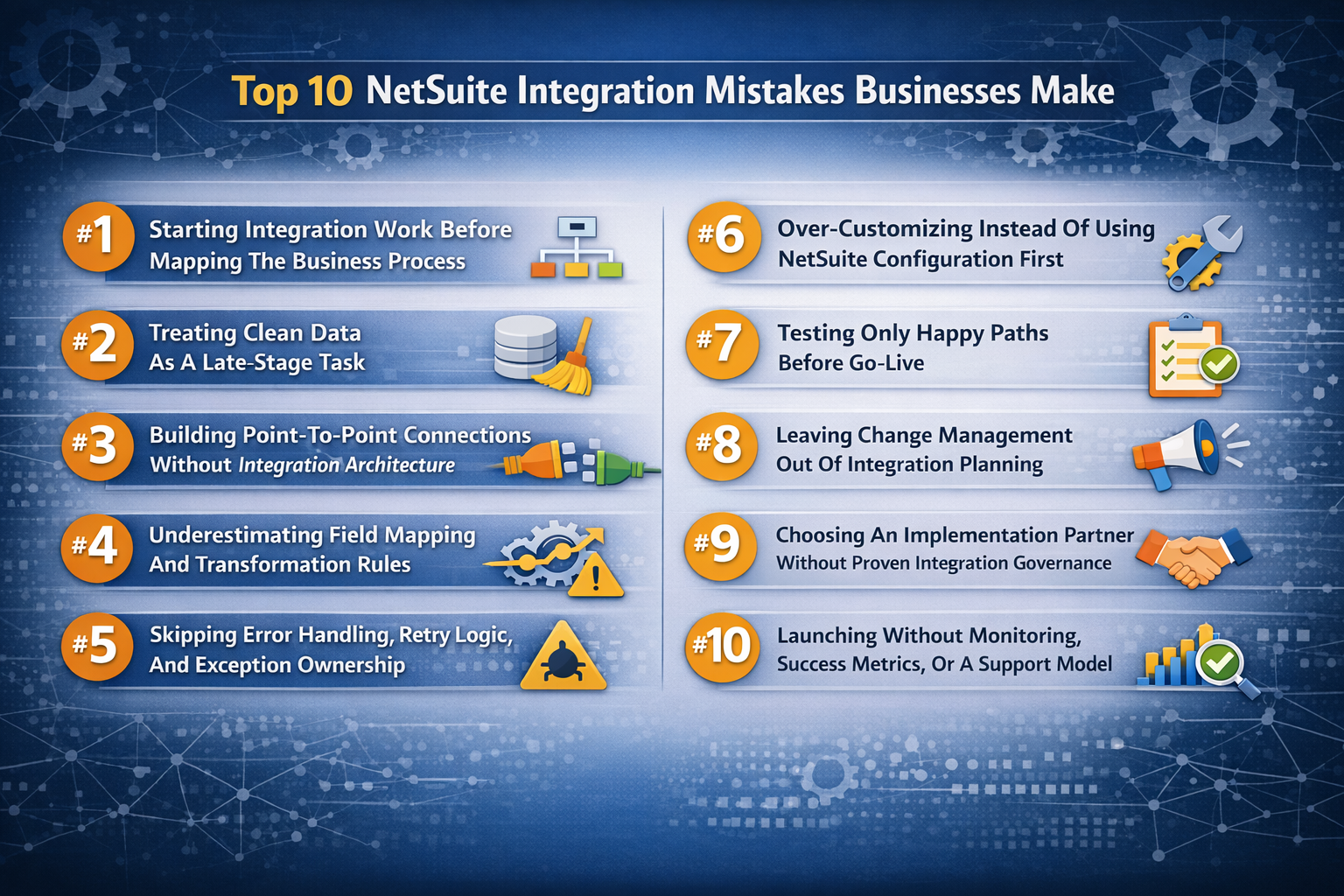
This is one of the most common mistakes companies make during a NetSuite implementation. Teams pick an integration tool, define a few endpoints, and start building work before they have mapped how orders, invoices, approvals, returns, procurement requests, or CRM handoffs should actually move. The result is a common integration problem that looks technical on the surface but starts with poor planning.
If you have not mapped the business process, you cannot define the right source of truth. This usually creates duplicate data entry, inconsistent status changes, and workflow conflicts between NetSuite ERP and the third-party systems connected to it.
A digital commerce order may close in the storefront, remain open in fulfillment, and post the wrong value into financials because each system was configured around a different assumption.
A controlled implementation process should show an end-to-end workflow map, system ownership by data object, approval points, exception paths, and the exact handoff where NetSuite takes control.
This also gives the implementation team a way to tailor the design to actual business needs instead of recreating legacy inefficiency inside a new enterprise resource planning environment.
Data quality problems spread faster in NetSuite integration work than in most standalone application projects. Once bad records begin syncing across systems, each correction becomes a reconciliation exercise instead of a simple fix. Therefore, clean data should be treated as a build input, not a post-build cleanup task.
Master Data Rules: Define how customer, vendor, item, tax, and location records will be created, updated, and approved. If those ownership rules stay vague, duplicate business data starts moving across systems and becomes harder to audit.
Migration Scope: Decide which historical records must migrate, which can stay archived, and which need transformation before they enter NetSuite. Without that decision, data migration expands late and stalls test cycles.
Field Completeness: Audit required fields, default values, address standards, SKU formats, and inactive record handling before sync logic is built. Missing values create frequent NetSuite validation failures that look like integration errors but start in the source data.
Reconciliation Method: Set record counts, balance checks, and exception thresholds for converted and synced data. If reconciliation rules are missing, teams cannot prove whether the NetSuite system is producing trusted financial reporting after go-live.
A common NetSuite implementation misstep is assuming the ERP will fix upstream data quality on its own. NetSuite can enforce structure, but it cannot repair inconsistent business data that arrives from disconnected workflows, weak approval controls, or rushed migration decisions.
A point-to-point integration can look efficient at the start because it gets a single workflow live quickly. The problem appears later, when CRM, e-commerce, procurement, fulfillment, tax, or support platforms each need their own logic, monitoring, and retry behavior. At that point, the integration architecture becomes a web of custom dependencies that nobody can change safely.
This matters most when a company is implementing NetSuite as the core ERP system but still relies on several legacy or third-party applications. A direct connection between two systems may work for the first release, but it often creates long-term value problems if the business expects more automation, more customization options, or long-term growth across systems.
Supply chain workflows, for example, usually need more than a simple order push. They need inventory timing rules, shipment events, backorder handling, procurement status updates, and financial reporting alignment.
Ask for an integration architecture document before the build begins. It should define the middleware or direct-connect approach, transformation ownership, sequencing logic, failure handling, monitoring points, and future expansion assumptions.
If the implementation partner cannot show that design, the project is not ready to configure durable integrations. It is only ready to connect a few endpoints and hope the rest stays stable.
Many common NetSuite integration errors begin with vague mapping decisions. A team may agree that data should sync from CRM to NetSuite or from an e-commerce platform into order management, but that is not enough. The real work sits in transformation rules, status translation, units of measure, tax handling, and financial dimensions that must mean the same thing across systems.
A solid mapping review should show how each critical field is sourced, transformed, validated, and reconciled. If the mapping sheet only lists the source field and the destination field, it is incomplete.
|
Data Area |
What Must Be Defined |
How To Verify It |
What Breaks If It Is Missed |
|---|---|---|---|
|
Customer Records |
Ownership for names, terms, addresses, tax flags, and status values |
Review field mapping sheet, create/update rules, and duplicate prevention logic |
CRM and NetSuite hold conflicting customer profiles, and billing errors increase |
|
Item And SKU Data |
SKU structure, units, pricing logic, inactive rules, and inventory location behavior |
Compare source records to NetSuite item setup and mock sync output |
Orders fail, inventory is misread, and procurement planning becomes unreliable |
|
Order Status Values |
Exact translation of pending, approved, shipped, canceled, and returned states |
Run scenario tests on status changes from source to destination |
Workflow automation fires at the wrong time, and users lose trust in the order lifecycle |
|
Tax And Payment Terms |
Tax codes, nexus logic, payment terms, and settlement handling |
Reconcile sample transactions from the source through the invoice output |
Financials and customer invoices do not align, which creates reporting and collections risk |
|
Department, Class, And Location |
Financial dimensions used in NetSuite for reporting and control |
Compare transaction postings to expected financial reporting output |
Revenue, cost, and margin analysis become hard to trust after go-live |
|
Dates And Time Zones |
Transaction dates, fulfillment timestamps, and posting periods |
Validate event timing in the sandbox across systems |
Transactions are posted in the wrong period, and operational workflow timing becomes inconsistent |
Field mapping is one of the most common places where teams underestimate the effort required for a successful NetSuite integration. It looks administrative until the first month-end close exposes missing dimensions, broken status logic, or inconsistent postings.
A seamless integration is not one that never fails. It fails in a controlled way, alerts the right people, and makes correction possible without guesswork. Therefore, error handling design matters as much as the happy-path sync.
When teams skip retry logic, failed record queues, and clear exception ownership, unexpected issues can end up stuck in limbo. A purchase order might fail due to a missing field, a return could break because the source system sends an invalid status, and a payment sync may be interrupted when someone manually edits the target record in NetSuite. If no one owns those cases, the issue moves from IT to OPS to finance and back again while the underlying records remain inconsistent.
Ask to see the exception workflow. It should define which errors retry automatically, which stop for manual review, who receives alerts, how root cause is logged, and how corrected records are resubmitted. If the implementation team cannot show that process, the integration may still go live, but it will rely on users to discover failed automation after the business process has already been affected.
Over-customization usually starts with a reasonable request. Teams want the new system to match an existing workflow, approval path, document layout, or third-party dependency. The risk shows up when every legacy habit becomes a build request, and nobody forces a clear decision between native NetSuite configuration, process redesign, and true custom development. This is where implementation cost expands, testing effort increases, and integration maintenance becomes harder after go-live.
Native Configuration First: Use standard NetSuite fields, forms, roles, workflows, and approval controls before approving custom scripts or custom objects. This reduces support effort and makes the implementation easier to maintain across upgrades.
Business Case For Each Custom Request: Ask what operational problem the customization solves, which users need it, what manual step it replaces, and what fails if it is not built. If the request only preserves a legacy preference, it is usually not strong enough to justify extra complexity.
Integration Impact Review: Check whether the proposed customization changes data structure, record ownership, status logic, or sync timing with CRM, e-commerce, procurement, or other third-party systems. A small custom change in NetSuite can create larger mapping and testing work across systems.
Upgrade And Support Cost: Review the testing, documentation, and support burden that each custom element adds. A feature that looks minor during implementation can become a long-term maintenance issue once the system evolves.
Three-Way Classification: Ask the implementation partner to classify each request as native configuration, light workflow change, or custom development. This makes over-customization visible early and keeps NetSuite pricing and scope from expanding through avoidable change orders.
Happy-path testing gives false confidence. It proves that a clean transaction can move through the system under ideal conditions, but it does not show whether the integration can handle the exceptions that define real operations. This gap is where many successful NetSuite implementation plans start to unravel.
Testing should prove that the integration works when records are incomplete, delayed, duplicated, corrected, canceled, partially fulfilled, or posted out of sequence. Without that evidence, go-live turns into production debugging.
|
Test Scenario |
Evidence Required |
Sign-Off Owner |
Production Risk If Skipped |
|---|---|---|---|
|
Duplicate Customer Or Order Submission |
Duplicate handling logic, merge rules, and queue behavior |
Business owner and integration lead |
Duplicate records distort reporting, fulfillment, and collections |
|
Partial Shipment Or Split Fulfillment |
Order updates, inventory relief, and invoice timing validation |
Operations lead and finance owner |
Orders close incorrectly, and revenue timing becomes inconsistent |
|
Return, Credit, Or Cancellation |
Reverse flow logic, status mapping, and financial reversal checks |
Finance owner and customer operations lead |
Refunds, credits, and stock movement diverge across systems |
|
Missing Required Source Data |
Validation rule output, alerting, and manual correction path |
Data owner and functional lead |
Records fail silently or users start bypassing the workflow |
|
Delayed Third-Party Response |
Retry behavior, timeout logic, and queue monitoring |
Technical lead and partner delivery lead |
Automation appears complete while transactions remain stuck |
|
Period-End Financial Posting |
Posting period behavior, class-location mapping, and reconciliation results |
Controller or finance lead |
Financial reporting cannot be trusted during close |
|
Sandbox-To-Production Promotion |
Deployment checklist, configuration comparison, and rollback plan |
Project lead and system owner |
Tested logic differs from production behavior at go-live |
A NetSuite sandbox is valuable only when the test cases reflect real business conditions. If the team cannot show signed test scripts, defect status, and reconciliation evidence, the project is not demonstrating readiness. It is demonstrating optimism.
Change management is critical in integration work because workflows can change even when the interface stays the same. Customer updates may no longer sit with the sales rep, warehouse leads may be responsible for resolving inventory exceptions through a new queue, and finance may need to review a different posting sequence before close. When those changes are not clearly communicated, users often blame NetSuite for problems that are really caused by confusion over roles and responsibilities.
This issue is especially common in ERP implementation projects that prioritize technical delivery above everything else. Teams invest heavily in connectors, customization, and data migration, but give far less attention to readiness, training, and decision-making authority. As a result, once go-live arrives, it becomes obvious that no one is quite sure who approves fixes, who can override errors, or who owns source-data changes after records begin moving between systems.
A strong change management plan should define process changes at the role level, assign responsibility for exception handling, provide workflow-based training, and connect communications to business impact.
In practice, this could mean giving sales clear guidance on when customer data must be updated in the CRM versus NetSuite, training warehouse teams on how to monitor and resolve inventory exceptions each day, and showing finance exactly how integrated transactions affect reconciliation and month-end close.
It may also include naming specific owners for failed sync reviews, documenting escalation paths for integration issues, and preparing each team for the process changes they will face before go-live.
The right implementation partner should be able to explain exactly how the integration will be governed after the contract is signed, not just claim familiarity with NetSuite integration best practices. Many companies miss that distinction. They focus on technical confidence during evaluation, but fail to examine the controls, ownership, and accountability structure that will shape the NetSuite implementation once the project begins.
Project Controls: Ask for a sample project plan, RAID log, issue escalation path, change request workflow, and cutover checklist. If those artifacts are thin, scope creep and delivery confusion usually follow.
Integration Evidence: Request an interface inventory, mapping template, test script example, and defect log format. These show whether the partner can manage common NetSuite integration work in a repeatable way.
Decision Ownership: Confirm who signs off on architecture, data rules, test completion, and go-live readiness. If approval rights are vague, the implementation team may keep moving while unresolved risks stay open.
Commercial Boundaries: Review assumptions, exclusions, customization limits, and support terms in the statement of work. That is where poor planning often turns into change orders, partner friction, and avoidable costs beyond base NetSuite pricing.
A successful NetSuite implementation partner brings discipline to business needs, not just technical delivery. If that governance is missing, the common mistakes to avoid will not stay contained and multiply across design, testing, and support.
Go-live should begin a controlled operating phase, not end the implementation process. Without monitoring and support ownership, integration issues usually surface after users report missing records, finance finds reconciliation problems, or operations discover a workflow delay. By that point, the team is already reacting to business disruption instead of managing it through evidence.
Success Metrics Before Go-Live: Define sync success rate, queue aging, reconciliation exception volume, order-to-posting latency, defect reopen rate, and manual correction volume before launch. In practice, teams usually set baseline targets for each measure, document acceptable variance, and review the results during mock runs or UAT so launch decisions are tied to performance rather than assumptions.
Named Review Ownership: Assign who reviews each metric, how often it is reviewed, and who can escalate when thresholds are breached. A stronger model maps each metric to a specific owner, review cadence, and escalation path, such as daily queue reviews by operations, weekly reconciliation checks by finance, and defined handoffs when issues cross systems or teams.
Alerting and Queue Visibility: Confirm that failed records, retries, and unresolved exceptions are visible through dashboards, logs, or queue reports. This usually means building shared visibility into failed transactions, separating critical errors from lower-risk warnings, and making sure the teams responsible for response can see the issue before it disrupts downstream work.
Support Coverage After Launch: Define who handles production issues, how defects are triaged, what response times apply, and how third-party vendors are engaged. A workable support model sets severity levels, assigns first-response responsibility, documents triage and routing steps, and confirms how internal teams, implementation partners, and outside vendors will coordinate once live issues appear.
Thresholds For Escalation Or Phased Rollout: Set the defect, timing, and reconciliation thresholds that trigger a release pause, rollback decision, or phased rollout adjustment. Strong teams agree on those thresholds before launch, tie them to specific actions, and use them in governance reviews so rollout decisions are based on predefined criteria instead of pressure to stay on schedule.
Long-Term Adaptability: Review whether the support model can handle future business needs, new systems, added automation, and changes in procurement, supply chain, or financial reporting. In practice, that means designing support around reusable processes, clear ownership, and flexible documentation so the integration can expand without forcing the team to rebuild its operating model every time the business changes.
Read Next:
Avoiding mistakes is important, but it does not prove that a NetSuite integration is ready for launch. Readiness has to be verified through documentation, ownership, testing evidence, and defined release criteria.
If the implementation team cannot produce the right artifacts, the build may be less controlled than it appears. If ownership is unclear, even minor failures can remain unresolved after go-live. A readiness audit helps teams confirm that the integration can operate under real business conditions, not just progress through the project plan.
A NetSuite integration should be supported by documents that show how the solution was designed, validated, approved, and prepared for ongoing support. These artifacts are evidence that business requirements were translated into controlled implementation decisions. When they are missing, incomplete, or too vague to review, the project becomes harder to govern, and the launch risk becomes harder to measure.
Interface Inventory: Document every integration, including the source system, target system, sync frequency, trigger, owner, and any upstream or downstream dependency. This gives the team a complete view of the integration scope and helps identify workflows that were discussed but never fully defined.
Field Mapping Pack: Record source fields, target fields, transformations, default values, validation rules, exception logic, and ownership for key business objects. A usable mapping pack should show how data is expected to behave in NetSuite, not just where values move from one system to another.
Test Evidence Set: Maintain signed test scripts, current defect status, negative-scenario coverage, reconciliation results, and business sign-off. This shows that the integration was tested against expected outcomes, exception conditions, and data accuracy rather than approved based on demonstrations alone.
Cutover Plan: Define final data migration timing, sync freeze windows, rollback criteria, business-owner approvals, and launch support coverage by day. A detailed cutover plan shows that go-live has been operationally prepared rather than treated as a target date on the project calendar.
Support Handoff Materials: Capture monitoring rules, queue ownership, escalation contacts, response targets, triage steps, and post-launch support responsibilities. These materials confirm that the integration can be supported in production without relying on undocumented knowledge from the implementation team.
Many integration projects slow down when responsibility is spread across too many teams. IT may own the connector, operations may own the workflow, finance may own the posting outcome, and the implementation partner may own part of the build without taking responsibility for post-launch issues. When a defect appears, each group can explain its role, but no one is accountable for resolving the issue end-to-end.
A readiness review should assign a business owner, technical owner, and support owner for every critical integration. It should also define escalation timelines, defect severity levels, after-hours coverage, and who has the authority to pause a release if open issues exceed the agreed threshold. Those controls do more than support issue resolution. They help the team contain problems early instead of letting routine exceptions turn into operational disruption.
This is also the stage where a formal system review may be worth considering. A targeted NetSuite Health Check can uncover performance, configuration, security, or functional issues that increase integration risk before go-live or continue to cause problems after a stalled implementation.
Go-live should be based on implementation readiness, not schedule pressure. Without clear thresholds, teams often move forward because the launch date has arrived, even when critical risks remain unresolved. Early production instability usually follows when that decision is driven by timing instead of evidence.
|
Readiness Area |
What Good Looks Like |
Verification Method |
Next Step if Not Ready |
|---|---|---|---|
|
Open Defects |
Only low-severity defects remain, each with a documented workaround, owner, and target resolution plan |
Review the defect log by severity, business impact, and unresolved dependency |
Delay launch or remove the affected scope from the initial release |
|
Data Reconciliation |
Converted balances and synced transactions fall within predefined and approved tolerance levels |
Compare mock conversion, reconciliation, and end-to-end test results against expected outcomes |
Run another validation cycle before approving cutover |
|
Business Readiness |
Critical users and process owners have completed role-based training and approved the updated workflow and exception process |
Review training completion, process sign-off, and readiness approval from key business owners |
Hold release until critical users and owners are trained and signed off |
|
Monitoring Setup |
Alerts, logs, dashboards, queue visibility, and escalation procedures are in place for critical integration failures and exceptions |
Validate the production monitoring and support checklist during the readiness review |
Launch in phases or add support coverage before cutover |
|
Third-Party Dependency Stability |
External vendors or platforms have completed required testing, confirmed dependency readiness, and aligned on cutover timing and support |
Review vendor sign-off, test evidence, and cutover support confirmation |
Pause release until dependency risk is resolved |
A phased rollout is often the better choice when transaction volume is high, the supply chain impact is broad, or multiple third-party dependencies still need close observation.
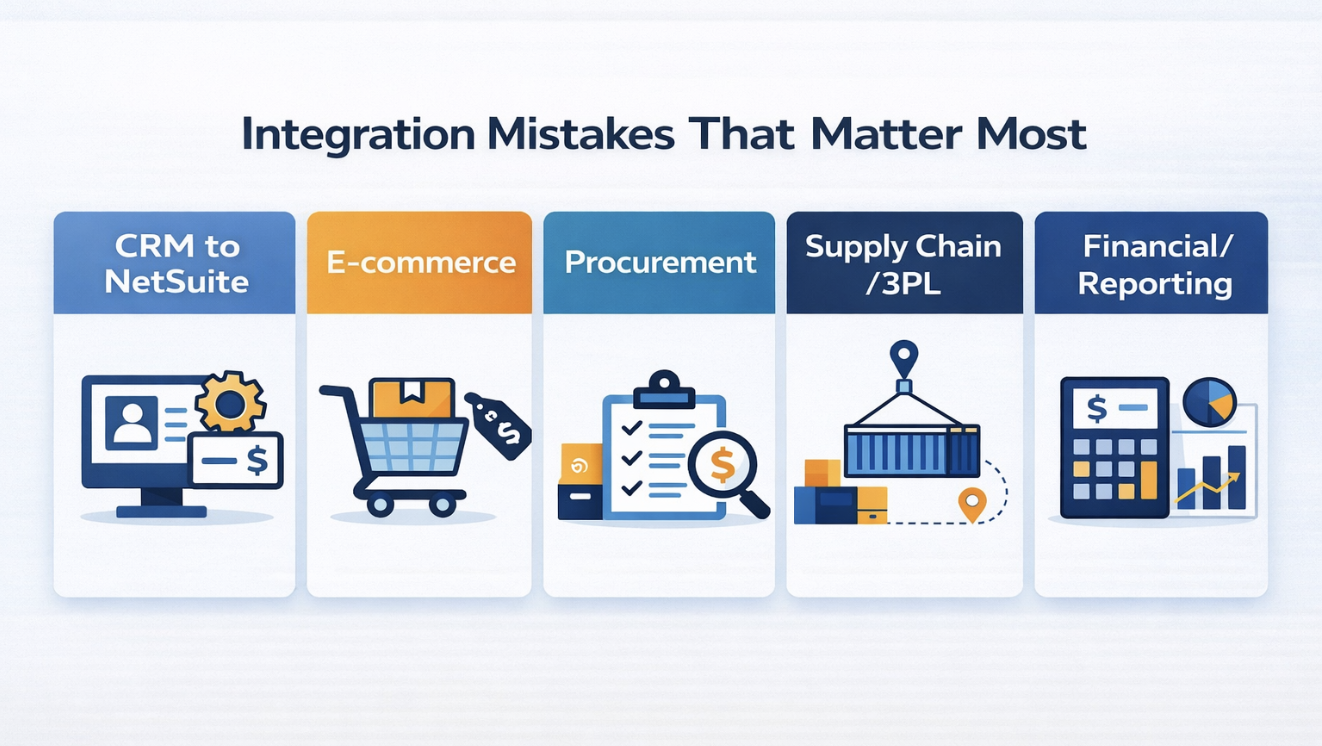
Not every NetSuite integration mistake creates the same level of risk. A customer sync issue in CRM can cause serious data problems, but an error in financial posting logic or a timing failure in supply chain fulfillment can disrupt a much broader part of the business. This matters during planning because teams often assess integrations at a high level instead of weighing the operational impact of each one. In practice, the real risk depends on transaction volume, downstream dependencies, and how quickly the business detects a failure.
|
Integration Scenario |
Common High-Risk Failure Point |
Likely Operational Consequence |
What to Verify First |
|---|---|---|---|
|
CRM to NetSuite |
Customer master ownership, duplicate handling, and field mapping gaps |
Customer, sales, billing, or account data can diverge across systems |
Customer master rules, field mapping, and duplicate-prevention logic |
|
E-commerce or digital commerce |
Order lifecycle, pricing, tax, or fulfillment-status logic gaps |
Orders and downstream fulfillment or tax handling can fall out of sync |
Order lifecycle mapping, tax handling, and partial-fulfillment testing |
|
Procurement platform |
Approval-state mapping, vendor-data ownership, or PO workflow gaps |
Purchase requests and orders can stall, misroute, or require manual correction |
Approval workflow, vendor master rules, and exception handling |
|
Supply chain or 3PL |
Missing retry logic, timing mismatches, or weak exception handling |
Inventory, shipment updates, and customer communication can become unreliable |
Queue monitoring, timing tolerance, and backorder scenario testing |
|
Financial or reporting systems |
Posting logic, segment mapping, accounting-period handling, or reconciliation gaps |
Reporting accuracy and close processes can be disrupted |
Posting validation, reconciliation rules, and period-end testing |
A controlled NetSuite integration depends on clear documentation, visible exception handling, and business verification before and after go-live. Design decisions should be easy to trace, failed transactions should be visible to the right teams, and workflow performance should be validated in real operating conditions rather than assumed.
Start with evidence: Review the statement of work, interface inventory, field mapping pack, test evidence, and support handoff before approving the final launch plan. These materials show whether the implementation has been designed, tested, and prepared for ongoing support.
Close ownership gaps: Assign a business owner, technical owner, and escalation owner for every high-impact integration. Clear ownership helps the team respond faster when a sync fails and prevents unresolved issues from drifting across systems.
Protect the first release: Use phased rollout, reconciliation thresholds, and post-launch monitoring when transaction timing, operational dependency, or financial impact is high. This is often the safer approach for complex CRM, procurement, and supply chain integrations.
This is where a review by an experienced NetSuite implementation partner becomes useful.
Kimberlite Partners supports companies that need to audit, stabilize, or improve NetSuite integration work through NetSuite Integration Services, NetSuite Implementation Services, and targeted NetSuite Health Check.
Schedule a free consultation today for a practical review of your architecture, mappings, test coverage, and support model.
NetSuite integrations connect NetSuite with other business applications so data and workflow can move between systems without repeated manual entry. In practice, that can include CRM, e-commerce, procurement, tax, shipping, support, payroll, or reporting platforms. The important evaluation point is not just whether NetSuite can connect, but how the integration handles mapping, validation, exception management, and ownership after launch.
NetSuite can integrate with a wide range of third-party systems, including CRM platforms, e-commerce tools, payment providers, logistics software, and custom applications. Common examples include Salesforce, HubSpot, Shopify, Magento, WooCommerce, Stripe, and other finance or operational platforms. The better question during a NetSuite implementation is which connections are business-critical, how each one will be governed, and whether the integration architecture can support future changes without heavy rework.
NetSuite is an ERP platform, while SAP is a separate software company with its own ERP products. For buyers, the practical distinction is not the label but the operating model: NetSuite is widely used as a cloud-based ERP system for companies that need financials, order management, reporting, and cross-functional workflow in one environment. Integration planning still matters because most businesses keep at least some surrounding systems in place during and after implementation.
NetSuite offers API access, but the total cost of using that access is not limited to the API itself. Companies still need to account for implementation effort, middleware or connector cost, testing, monitoring, support coverage, and any custom logic needed to align the integration with business needs. That is why a low-friction API does not automatically mean a low-risk or low-cost integration.
The five stages are commonly described as project definition, project team formation, project design, project rollout, and project communications, though naming can vary by methodology. In a NetSuite implementation, integration work should appear across those stages rather than being pushed into rollout alone. If architecture, data quality, and testing are delayed until the end, the implementation carries much higher go-live risk.
The four key ERP implementation strategies are usually described as Big Bang, Phased, Parallel, and Hybrid. The right choice depends on transaction volume, process complexity, training readiness, and how many integrations must work across systems on day one. For NetSuite integration projects with high financial reporting or supply chain exposure, phased or hybrid rollout often reduces risk more effectively than a full cutover.

Operations and finance leaders at professional services firms face a unique balancing act: keeping projects staffed, clients happy, and revenue...

Choosing a NetSuite implementation partner is one of the few ERP decisions that affects the operating problems you inherit later. The wrong partner...

NetSuite security needs regular review because the platform centralizes financial data, business workflows, user permissions, scripts, and...